

Description
Download Mp3 Cutter Ringtone Maker APK – Free Ringtone Creator, Audio Editor, Android Utility
Overview
Mp3 Cutter Ringtone Maker is a free Android application developed by GDInt, designed to help users create custom ringtones, notifications, alarms, and music clips from their favorite audio files. The software serves as a lightweight utility for personalizing mobile devices by allowing users to extract specific segments from longer audio tracks. It is particularly useful for individuals who enjoy customizing their smartphone experience with unique audio cues tailored to their preferences.
The app supports a wide variety of audio formats, including MP3, WAV, AAC, AMR, OGG, FLAC, M4A, MP5, M4B, OGM, WMA, and more, ensuring broad compatibility with most music and audio files stored on Android devices. It enables users to trim audio from the beginning, middle, or end of a file, or divide it into multiple smaller segments. This functionality makes it suitable for both casual users and music enthusiasts looking to create personalized audio content without needing advanced editing tools.
Real-world usage scenarios include transforming a favorite song into a short ringtone, extracting a specific melody for an alarm, or creating a custom notification sound. The developer did not provide additional details about the company or its background beyond the name GDInt. The app is designed specifically for Android, with no indication of cross-platform availability.
Key Features & Capabilities
- Audio Trimming Tools – Users can cut audio clips from any part of a file, including the start, middle, or end, with precision controls for selecting exact time intervals.
- Multiple Output Modes – The app supports creating ringtones, notifications, alarms, and standalone music files, offering versatility for different device personalization needs.
- Wide Format Support – Compatible with MP3, WAV, AAC, AMR, OGG, FLAC, M4A, MP5, M4B, OGM, WMA, and other common audio formats, ensuring broad file compatibility.
- Editing and Preview Modes – Two distinct modes allow users to edit audio and preview changes before finalizing the output, enhancing accuracy and user confidence.
- Audio Adjustments – Users can modify volume levels and playback speed to fine-tune the output audio to their liking.
These features enable users to efficiently extract and customize audio content directly on their Android devices. For example, a user might select a 30-second segment from a song to use as a ringtone, adjust the volume to prevent it from being too loud, and then save it as a notification sound. The ability to preview audio before cutting helps avoid errors and ensures the final result meets expectations. The app’s focus on simplicity and accessibility makes it ideal for users who want quick, no-frills audio editing without the complexity of professional tools.
User Interface, Workflow & Performance
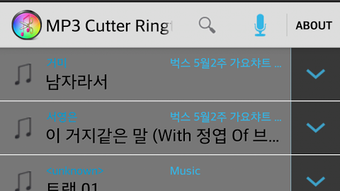
Mp3 Cutter Ringtone Maker features a clean, intuitive interface designed for ease of use on mobile devices. Navigation is straightforward, with clearly labeled buttons and visual feedback during the editing process. The workflow is linear: users select an audio file, enter editing mode, define the desired segment, adjust settings if needed, and export the result.
The app’s design prioritizes accessibility, allowing users to perform tasks with minimal steps. The editing and preview modes are well-integrated, enabling real-time listening to selected segments before finalizing the cut. This helps users make informed decisions without requiring technical expertise. The developer did not specify resource usage details, so exact performance behavior, such as CPU or RAM consumption, remains unknown.
Stability and responsiveness are expected to be consistent with typical Android utility apps, but specific benchmarks or long-term usage observations were not provided. General software behavior patterns suggest smooth operation on modern Android devices. Users should expect minimal lag during basic trimming tasks, though performance may vary depending on device hardware and file size.
Compatibility & System Requirements
Mp3 Cutter Ringtone Maker is designed for Android devices and is distributed as an APK file, indicating it is intended for installation on Android smartphones and tablets. The supported operating system is Android, though the specific version requirements were not listed. The app’s installation size is not specified, so exact storage needs cannot be determined.
Compatibility information was partially provided, with no mention of minimum RAM, processor, or storage requirements. The developer did not provide additional system requirements. Users should ensure their device meets standard Android app installation criteria. For optimal performance, it is recommended to use the app on devices with sufficient storage and processing power to handle audio file loading and processing.
Pros and Cons
Pros
- Free to download and use with no hidden costs.
- Supports a wide range of audio formats for maximum flexibility.
- Simple, user-friendly interface suitable for beginners.
- Offers both editing and preview modes for better control.
- Allows customization of ringtones, notifications, alarms, and music clips.
Cons
- Exact system requirements were not specified.
- Performance details, such as CPU or RAM usage, were not provided.
- Only available for Android, limiting cross-platform use.
- No mention of cloud sync, batch processing, or advanced editing features.
- APK distribution may raise security concerns for users unfamiliar with sideloading.
FAQ Section
Is Mp3 Cutter Ringtone Maker safe to download?
The app is distributed as an APK file, which may require enabling installation from unknown sources. Users should download the file from trusted sources to reduce the risk of malware. Always scan the APK with a reputable antivirus tool before installation.
Can I use this app on iOS devices?
No, the app is designed exclusively for Android. There is no version available for iOS or other platforms.
Does the app require an internet connection?
Basic trimming and editing functions can be performed offline. However, some features or updates may require an internet connection, depending on the app’s design.
How do I install the APK file?
To install, enable “Unknown Sources” in your device’s settings, locate the downloaded APK file, and tap to begin installation. Follow the on-screen prompts to complete the process.
Is the app free to use?
Yes, Mp3 Cutter Ringtone Maker is available as a free application with no in-app purchases or subscription fees mentioned in the provided information.
Final Thoughts
Mp3 Cutter Ringtone Maker delivers a straightforward and effective solution for Android users seeking to personalize their device audio. Its support for multiple formats, simple interface, and dual-mode editing experience make it a practical tool for creating custom ringtones and audio clips. While it lacks advanced features and detailed technical specifications, it fulfills its core purpose efficiently and reliably.
For music lovers, casual users, and anyone wanting to customize their Android experience, this app offers a valuable utility without complexity. It is particularly well-suited for those who value quick, on-the-go audio editing without the need for desktop software or complex workflows.
Download Mp3 Cutter Ringtone Maker now and start creating your own unique audio experiences today.
Guides & Tutorials for Mp3 Cutter Ringtone Maker APK
How to install Mp3 Cutter Ringtone Maker APK
- Click the Preview / Download button above.
- Once redirected, accept the terms and click Install.
- Wait for the Mp3 Cutter Ringtone Maker APK download to finish on your device.
How to use Mp3 Cutter Ringtone Maker APK
This software is primarily used for its core features described above. Open the app after installation to explore its capabilities.
User Reviews for Mp3 Cutter Ringtone Maker APK 0
No reviews found





